Overview
spectral-unmixing is a Python package for linear spectral unmixing in fluorescence microscopy images. It provides workflows for directed linear unmixing and PICASSO-family blind unmixing, along with optional post-unmixing helpers for filtering, projection, registration, and napari visualization. It’s main purpose is to provide a simple, scriptable, and reproducible solution for spectral bleed-through correction in multi-dimensional microscopy stacks.
What is bleed-through and why is it a problem?
In fluorescence microscopy, bleed-through, also called crosstalk or spectral spillover, occurs when signal from one fluorophore is detected in the measurement channel of another fluorophore. A common reason is spectral overlap between fluorophore emission and the selected detection windows, but the problem also depends on the optical filters, detector settings, and the overall imaging setup.
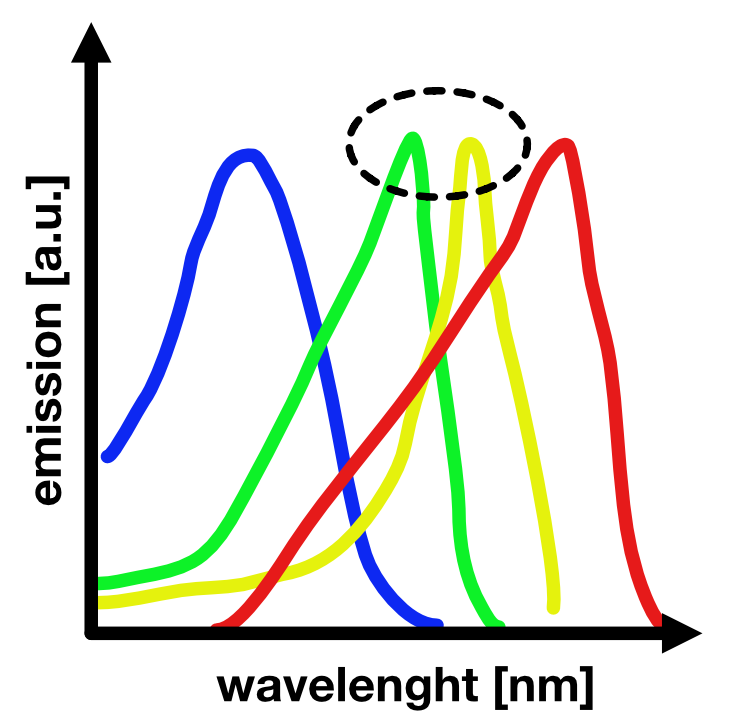
Figure 1. Schematic illustration of spectral bleed-through in fluorescence imaging setups. Shown are four different fluorophores (blue, green, yellow, red) and their respective emission spectra as a function of wavelength. Bleed-through occurs when the emission of one fluorophore is also detected in another channel, for example when green emission is partially recorded in the yellow channel. This can happen if detection windows are not cleanly separated, if the selected detection range is too broad, or if the emission peaks of two fluorophores lie too close together. Source: fabriziomusacchio.com (license: CC BY-NC-SA 4.0)
Biologically and analytically, this is a problem because it can create false-positive signal, inflate apparent colocalization, distort intensity measurements, and ultimately bias the interpretation of cellular structures or dynamics. In practice, one may incorrectly conclude that a structure is present in a given channel even though part of the observed signal actually originates from another fluorophore.
Spectral unmixing aims to correct for this contamination by estimating the contribution of one channel to another channel and subtracting it out, thereby recovering a better approximation of the true signal of interest. In this package, the core correction models are linear, and the blind-unmixing workflow estimates linear mixing relationships directly from the measured data.
What the package does
spectral-unmixing focuses on spectral bleed-through correction in
multi-dimensional microscopy stacks. It supports:
linear two-channel unmixing via
unmix(...)optional bidirectional two-channel correction via inversion of a 2x2 linear mixing model
multiple alpha-estimation strategies for linear unmixing
PICASSO-family blind unmixing via
unmix_picasso(...)optional follow-up helpers for filtering, projection, registration, and napari visualization
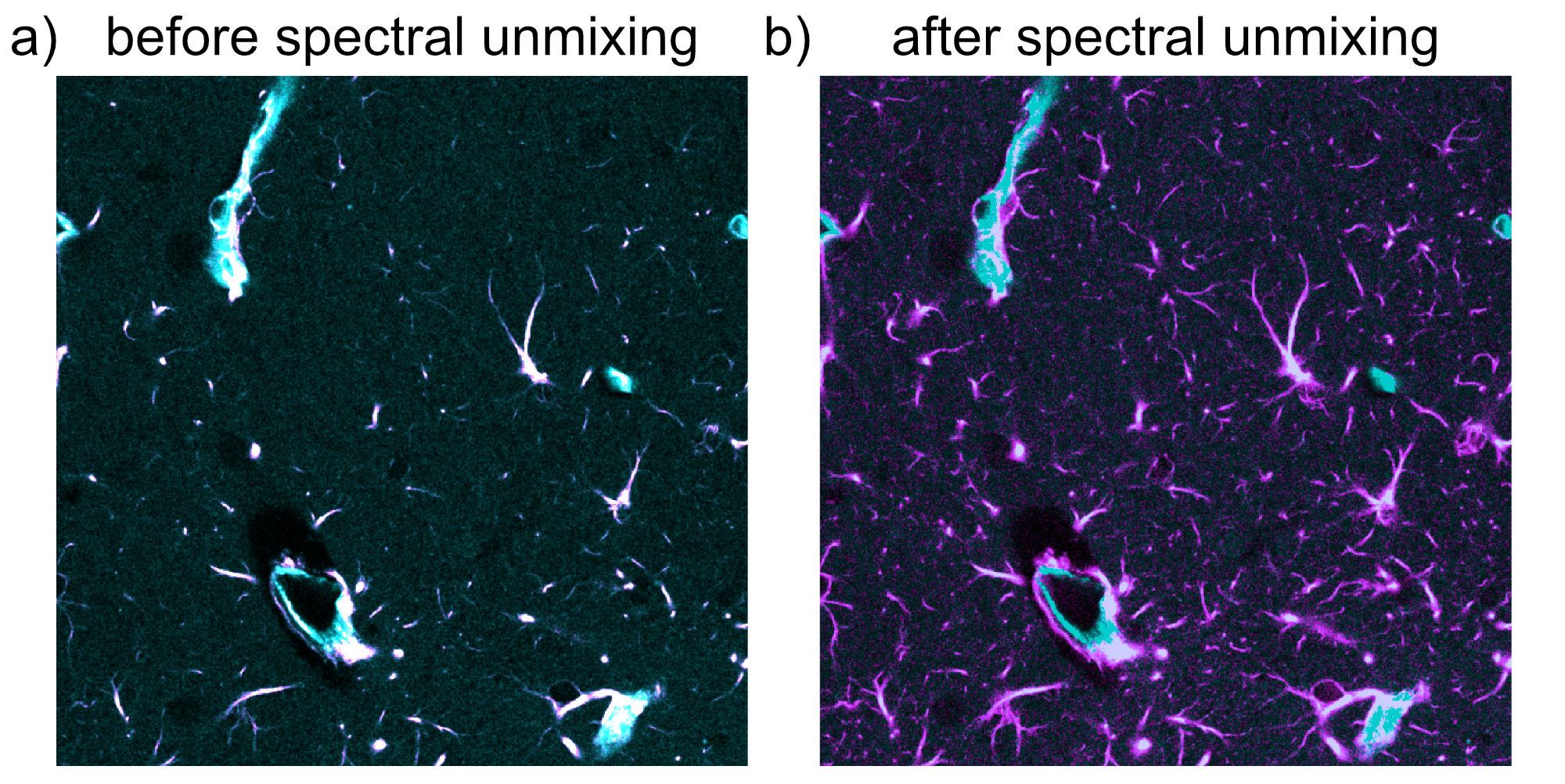
Figure 2. Example of spectral unmixing in a two-channel 2D fluorescence
image. Panel a) shows the spectrally mixed input image, in which signal
from the cyan channel bleeds into the magenta channel. Panel b) shows
the result after correction with spectral-unmixing using a fixed alpha,
which improves the separation of the two channels and reduces false-positive
magenta signal originating from cyan bleed-through. Source image data:
figshare dataset
(CC BY 4.0), from Seo, J., Sim, Y., Kim, J. et al. PICASSO allows
ultra-multiplexed fluorescence imaging of spatially overlapping proteins
without reference spectra measurements. Nature Communications 13, 2475
(2022). https://doi.org/10.1038/s41467-022-30168-z.
Stack model and file formats
- The package uses OMIO to read
and write image stacks, which are returned in canonical OME-order
TZCYX:
T: timeZ: z-planeC: channelY: image heightX: image width
This means the workflows support:
full time-lapse z-stacks,
single-time-point 3D stacks,
2D multi-channel images with
Z=1,and mixed cases such as
T>1, Z=1.
Input is intentionally format-agnostic on the package side. Any microscopy file format currently supported by OMIO can be used as input. Output stacks are written back through OMIO, typically as OME-TIFF.
Spectral unmixing model
The implemented correction assumes that one channel contributes linearly to another channel:
Here:
\(I_{\mathrm{source}}\) is the measured intensity in the source channel
\(I_{\mathrm{target}}\) is the measured intensity in the target channel
\(S\) is the true source-channel signal
\(T\) is the true target-channel signal
\(\alpha\) is the bleed-through coefficient from source into target
Under this model, the source channel contaminates the target channel linearly. The actual unmixing step therefore subtracts the estimated source contribution from the measured target signal:
This is the core linear spectral unmixing equation.
In practice, the subtraction can produce negative values in pixels or voxels where the estimated bleed-through contribution is slightly larger than the measured target intensity. Since negative intensities are not physically meaningful for the final corrected image, the pipeline can optionally apply a second, purely post-processing step:
So these are not two different models. They are two consecutive steps:
linear unmixing by subtraction
optional clipping of negative values to zero
Only the chosen target channel is corrected. The source channel is left unchanged.
This is a linear unmixing workflow. The package does not implement a nonlinear unmixing model.
Optional bidirectional unmixing
For some imaging setups, bleed-through can occur in both directions. The
package therefore optionally supports bidirectional two-channel unmixing via
bidirectional=True.
In that case, the model becomes:
where:
\(\alpha_{01}\) denotes bleed-through from channel \(0\) into channel \(1\)
\(\alpha_{10}\) denotes bleed-through from channel \(1\) into channel \(0\)
This can be written in matrix form as:
The unmixed signals are then obtained by inverting this \(2 \times 2\) mixing matrix:
Equivalently:
This is preferable to sequential subtraction, because sequentially subtracting one mixed channel from the other would depend on the update order.
Blind unmixing in the PICASSO family
In addition to direct linear correction, the package provides
unmix_picasso(...) for PICASSO-family blind unmixing, motivated by the original
PICASSO publication:
Seo, J., Sim, Y., Kim, J. et al. PICASSO allows ultra-multiplexed fluorescence imaging of spatially overlapping proteins without reference spectra measurements. Nature Communications 13, 2475 (2022). https://doi.org/10.1038/s41467-022-30168-z
In this context, “blind” means that mixing relations are estimated from the measured data rather than supplied as fixed reference spectra.
Three implementation paths are available:
matlab_3c: a close Python port of the original MATLAB 3-channel PICASSO workflowmatlab_n: an explicit N-channel generalization of that 3-channel workflowsource_sink_n: a source-sink formulation in which selected channels are corrected as sinks from one or more modeled source channels
These workflows still use linear channel-mixing assumptions. What differs is how the mixing coefficients are inferred.
The underlying linear model is:
where:
\(I\) is the vector of measured channels
\(F\) is the vector of latent fluorophore signals
\(M\) is an unknown mixing matrix
The blind-unmixing goal is to infer an unmixing transform from the data without supplying an external reference-spectrum matrix.
matlab_3c: close port of the original MATLAB algorithm
In the original MATLAB-style workflow, the current channel vector \(\mathbf{v}^{(k)}\) is updated iteratively:
where the incremental update matrix is:
Here:
\(I\) is the identity matrix
\(s\) is the user-controlled
step_size\(A^{(k)}\) is a matrix of pairwise subtraction coefficients
For each ordered channel pair \((i, j)\), the MATLAB-style routine estimates a scalar \(\alpha_{ij}\) by minimizing histogram-based mutual information after subtracting one channel from the other:
The off-diagonal entries of \(A^{(k)}\) are then:
The Python port follows the MATLAB routine closely, including:
per-channel max normalization before estimation
low-percentile background subtraction
2D pixel binning before mutual-information estimation
coefficient clipping with
alpha_clipMATLAB-style negativity checks and optional positivity enforcement
matlab_n: explicit N-channel generalization
The matlab_n mode keeps the same pairwise-update idea, but extends it from
three channels to \(N\) selected channels:
with pairwise coefficients estimated for all ordered channel pairs \((i, j)\), \(i \neq j\).
Conceptually, this is a pragmatic extension of the MATLAB algorithm. It is not claimed to be the original PICASSO publication’s exact N-channel method, because the published MATLAB code itself is specialized to three channels.
source_sink_n: explicit source-sink modeling
The source_sink_n mode uses a more direct formulation. For each sink
channel \(j\), the corrected sink is modeled as:
where:
\(\mathcal{S}_j\) is the set of source channels allowed to contribute to sink \(j\)
the allowed source-sink relations are encoded in
source_sink_matrix\(\hat{S}_i\) is a prepared source image for channel \(i\)
When background optimization is enabled, the prepared source image becomes:
with one optional background offset \(\beta_{ij}\) per modeled source-sink relation.
For users who do not want to write the full matrix manually, the same relation graph can be built more readably from channel-role lists:
sink_channels=[...]: selected channels that should be corrected as sinksneutral_channels=[...]: selected channels that should remain neutral, meaning they are neither corrected as sinks nor used as sources
In that convenience mode, all selected non-neutral channels are allowed to bleed into all specified sink channels except into themselves.
The current implementation optimizes all sources contributing to one sink jointly by default. For a sink channel \(j\), the optimization problem is:
subject to
and, if background optimization is enabled,
This joint formulation is controlled by:
source_sink_joint_optimization=True: optimize all sources contributing to one sink togethersource_sink_optimize_background=True: estimate one small background offset per source-sink relationsource_sink_max_background: upper bound for these background offsets on normalized intensitiessource_sink_n_restarts: number of multi-start optimizer initializations used for each sink
This mode is inspired by the napari plugin’s source-sink viewpoint, but it is not a neural or MINE-based reimplementation of that plugin. Instead, it uses a histogram-based mutual-information objective together with bounded numerical optimization.
Optional helper modules
The package also includes secondary helper functionality for post-unmixing processing:
apply_filters(...): median and Gaussian filtering for canonicalTZCYXstacksmatch_histograms_across_time(...): time-wise histogram matching against the first time pointmax_z_project(...): z-projection while preservingTandCregister_stack(...): time registration using eitherpystackregorphase_cross_correlationcorrect_intra_stack_z_drift(...): optional within-stack z-drift correctionshow_unmixed_channels_in_napari(...)andshow_all_channels_in_napari(...): reusable napari inspection helpers
The current documentation focuses primarily on the unmixing workflows. The filtering and registration modules are already available and are summarized in the usage documentation, but their dedicated tutorial pages can be expanded later.
Reproducibility
Every unmixing run writes a JSON sidecar report next to the output stack. This report stores the parameters used for the run, including the selected mode, channel assignments, estimated coefficients, and implementation settings. This makes the package suitable for transparent, script-based microscopy workflows.
Modularity and contributions
spectral-unmixing is intentionally built in a modular way. The core
unmixing logic, blind-unmixing routines, filtering helpers, registration
helpers, projection helpers, viewer helpers, and I/O helpers are separated into
reusable package modules so that the pipeline can be extended without having to
rewrite the overall workflow. This modular structure is intentional: It should
be straightforward to add further spectral-unmixing methods, additional
alpha-estimation strategies, and new pre-processing or post-processing
filters as the project evolves.
Contributions are therefore very welcome. If you would like to suggest a new
feature, propose an add-on workflow, improve the documentation, or contribute a
new implementation, please see the Contributing page and use the GitHub
issue tracker for feature requests, bug reports, and discussion:
https://github.com/FabrizioMusacchio/spectral-unmixing/issues
License
spectral-unmixing is released under the GNU General Public License v3.0 or
later (GPL-3.0-or-later). See the repository’s LICENSE file
(link)
for the full license text.
Citation
If you use Spectral Unmixing in scientific work, please cite:
Musacchio, F. (2026). Spectral Unmixing: A Python package for linear spectral unmixing in microscopy images. Zenodo. https://doi.org/10.5281/zenodo.20933784
Where to start
If you are new to the package, a good reading order is:
the more specialized tutorial pages in Usage